Showing posts with label Internet. Show all posts

Thursday, December 31, 2009

Vista, Internet Explorer and Outlook tips

Vista, Internet Explorer and Outlook tips

Internet Explorer

Is tabbed browsing cluttering up your life?
In the Tools menu, select Internet Options. In the General tab, under Tabs, click the Settings button. Uncheck the topmost checkbox, which is labeled Enable Tabbed Browsing (requires restarting Internet Explorer), and click OK. To enable the tabbed browsing function later, just go back and select this option, and save your preferences.

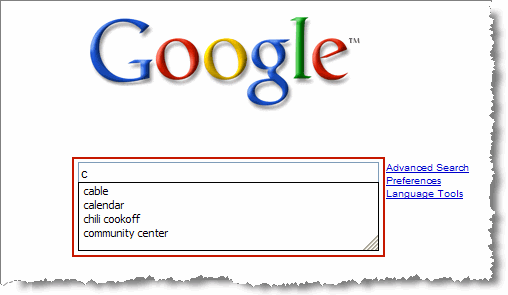
Find on the Web Page
Monday, December 21, 2009

The Port Guide, Port number and info

This summary is not available. Please click here to view the post.

Monday, December 14, 2009

getting movies, mp3,games using google


okay lets keep this tutorial short. you want movies and games/mp3 / games and dont' know where to get them, thank god there is google.com
goto www.google.com

put this string in

BandWidth Explained


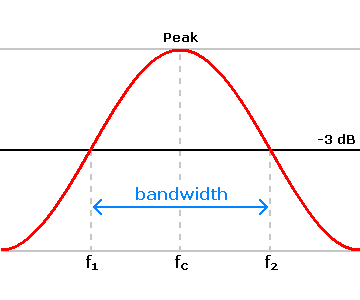
Most hosting companies offer a variety of bandwidth options in their plans. So exactly what is bandwidth as it relates to web hosting? Put simply, bandwidth is the amount of traffic that is allowed to occur between your web site and the rest of the internet. The amount of bandwidth a hosting company can provide is determined by their network connections, both internal to their data center and external to the public internet.

Sunday, December 13, 2009

How to use the Google calculator


Google’s calculator tries to understand the problem you are attempting to solve without requiring you to use special syntax. However, it may be helpful to know the most direct way to pose a question to get the best results. Listed below are a few suggestions for the most common type of expressions (and a few more esoteric ones).

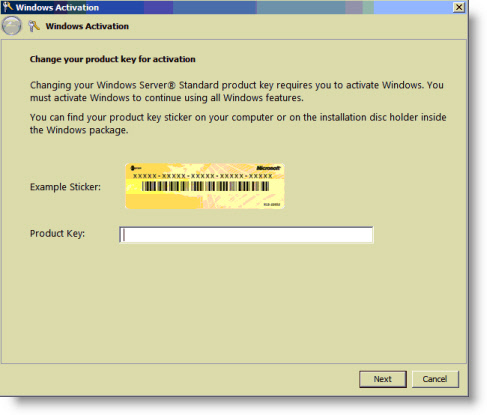
How to get the serial number you need


Get the serial number you need ! (For Certain Things)

* Go to Google.

* In the search field type: "Product name" 94FBR

Saturday, December 12, 2009

Using Google for searching ebooks


Google has some fantastic potential for you to find whatever you are after on the internet.
To search for a book / program / file perhaps try the following.
Go to Google's search page and use the following criteria in the search dialog
intitle:index.of? file extension Name of item

Thursday, December 10, 2009

How 2 Find EVERYTHING uploaded on Rapidshare


All rapidshare.de Downloads:
/http://www.google.com/search?hl=en&lr=&as_qdr=all&q=+.*+site%3Arapidshare.de

Wednesday, December 9, 2009

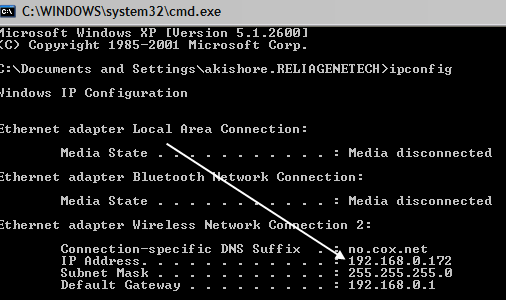
How To: Change Your Ip In Less Then 1 Minute


1. Click on "Start" in the bottom left hand corner of screen
2. Click on "Run"
3. Type in "command" and hit ok

You should now be at an MSDOS prompt screen.

Tuesday, December 8, 2009

Gmail Shortcut Keys

Note: Must have "keyboard shortcuts" on in settings.

  • C: Compose new message.
  • Shift + C: Open new window to compose new message.
  • Slash (/): Switch focus to search box.
  • K: Switch focus to the next most recent email. Enter or "O" opens focused email.
  • J: Switch focus to the next oldest email.
  • N: Switch focus to the next message in the "conversation." Enter or "O" expands/collapses messages.
  • P: Switch focus to the previous message.
  • U: Takes you back to the inbox and checks for new mail.

Gmail Tips And Tricks

Gmail Tip #1: All About Labels

You can add a Label to a message in one of two ways:
  1. If you are viewing a message listing, you can just click the checkbox next to the message, click on the "Apply label..." dropdown, and select the Label you want to apply. Gmail will display the Label just to the left of the message's Subject.
  2. If you are viewing a message, just click on the "Apply label..." dropdown, and select the label you want to apply. Gmail will display the new label to the right of the Subject line.
OK, you assigned a Label to a message, but at a later time, you want to remove it. How do you do that? Just select the Label view from the Labels box on the left,

All About Movie Tags (what Is A Dvdrip, Cam Etc.)


CAM -
A cam is a theater rip usually done with a digital video camera. A mini tripod is sometimes used, but a lot of the time this wont be possible, so the camera make shake. Also seating placement isn't always idle, and it might be filmed from an angle. If cropped properly, this is hard to tell unless there's text on the screen, but a lot of times these are left with triangular borders on the top and bottom of the screen.